
Is my phone unlocked?
Check in under a minute, before you buy. A Flylo eSIM works on any carrier-unlocked phone that supports eSIM — so there are two things to confirm.
The two checks: (1) Your phone is carrier-unlocked — it accepts service from any provider, not just the one that sold it. (2) Your phone supports eSIM — look for an “Add eSIM” option in your cellular settings. Both need to be true. An unlocked phone without eSIM support, or an eSIM-capable phone that is still carrier-locked, will not work with a Flylo eSIM.
iPhone
Works on iOS 14 and later. This is Apple's own check, and it takes about ten seconds.
- Open the Settings app.
- Tap General.
- Tap About, then scroll down to Carrier Lock.
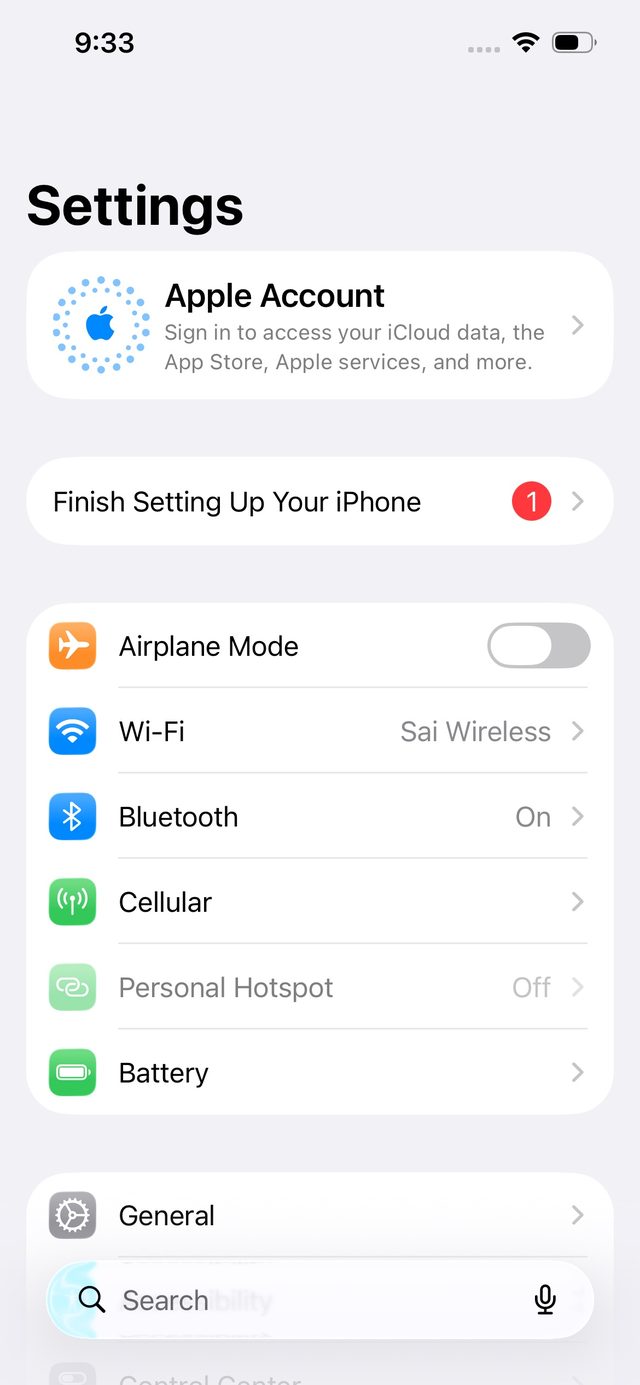
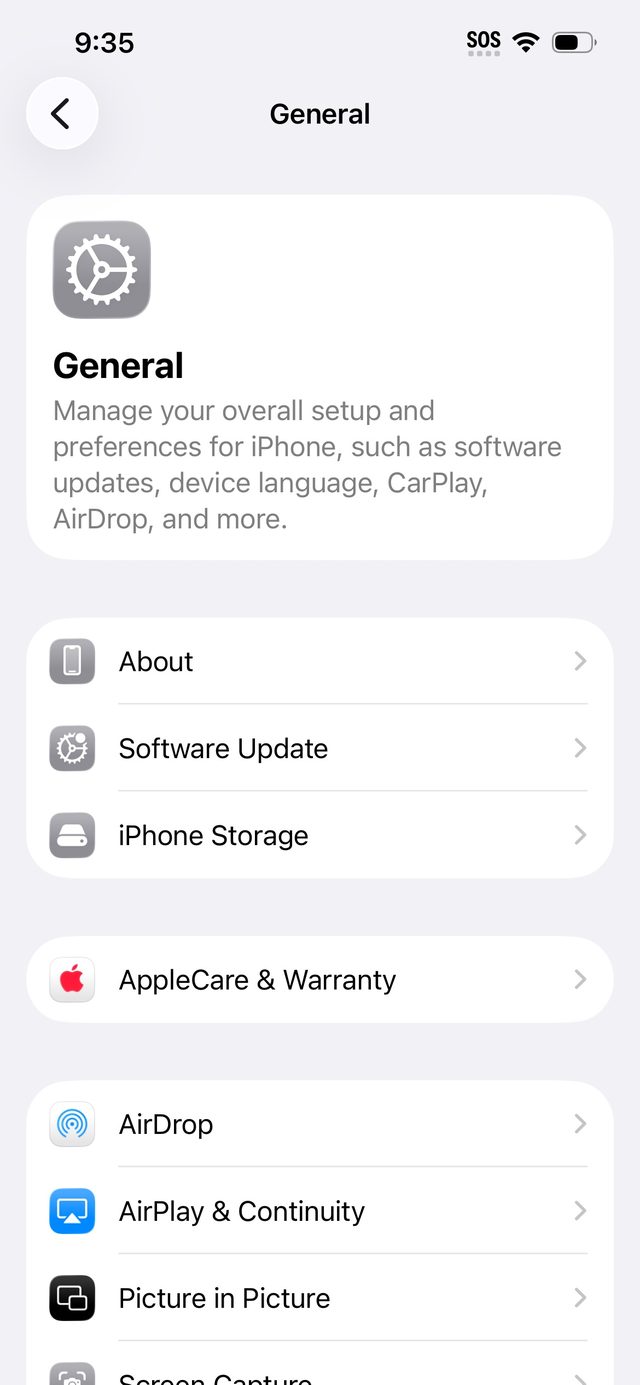
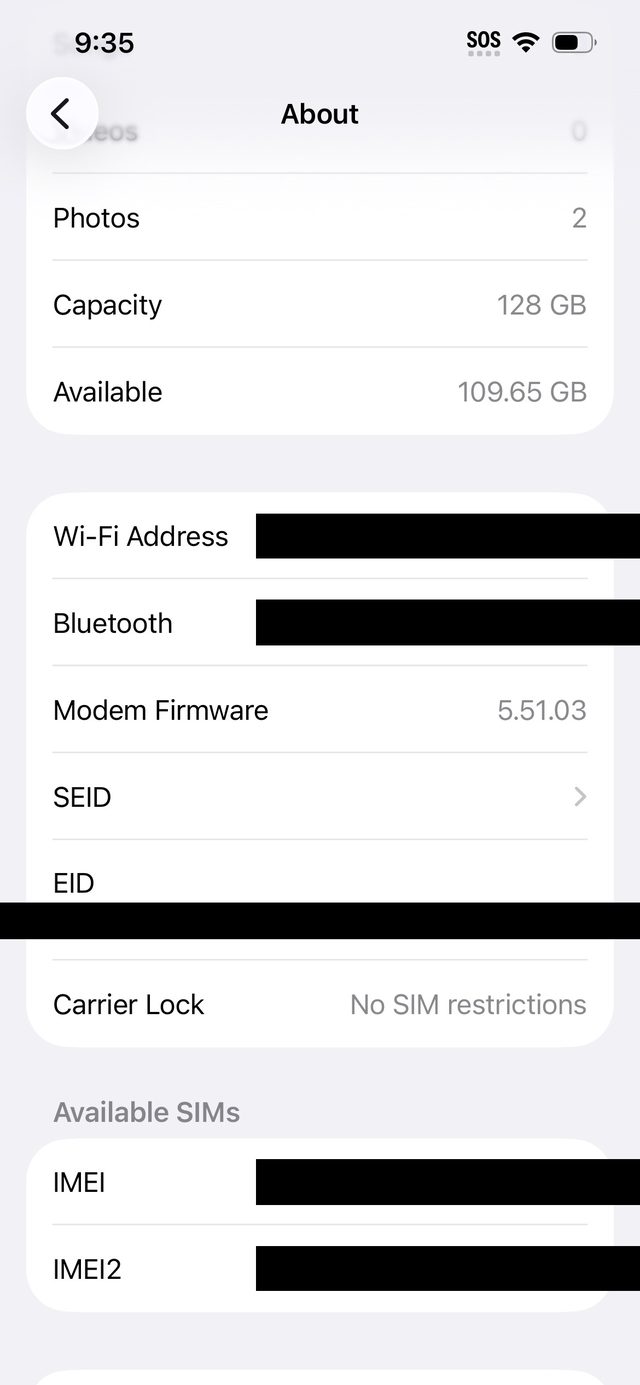
“No SIM restrictions” = unlocked. Your iPhone will work with a Flylo eSIM.
“SIM locked” = locked. Your iPhone only works with its carrier until they remove the lock — see below. Only your carrier can unlock it; Apple cannot.
On iOS 13 or earlier there is no Carrier Lock field — ask your carrier to confirm the unlock, and they may ask you to restore the phone to complete it.
Samsung Galaxy
Samsung has no single guaranteed lock-status screen, so try these in order. Menus vary slightly by model and software version.
Method 1 — Settings check
Look at the networks your phone can see
- Open Settings → Connections → Mobile networks → Network operators.
- Turn off Select automatically and let it search.
Multiple networks listed = likely unlocked. Only your current carrier listed, even after searching = likely locked.
Method 2 — Dialer code (some models)
Check the network lock status directly
Open the Phone app and dial *#7465625#. If a lock-status menu appears, look for Network Lock: OFF means unlocked, ON means locked. This code does not work on all models — carriers have disabled it on some.
Method 3 — The sure test
Try a SIM from another carrier
Borrow a SIM from a friend on a different carrier and insert it. If the phone connects normally, it is unlocked. If it shows “SIM not supported,” “Invalid SIM,” or asks for an unlock code, it is locked.
Still unsure? Your carrier can confirm definitively. Have your IMEI ready — find it in Settings → About phone, or dial *#06#.
If your phone is locked, here's what to do
Only the carrier that locked the phone can unlock it. Contact them, and expect it to take a few days. Unlocking is permanent once granted, and it covers eSIMs too — a carrier lock blocks eSIMs from other providers just like physical SIMs.
T-Mobile
- Postpaid: device active on T-Mobile for at least 40 days, and any financing paid off.
- Prepaid: active for 365 days (or $100+ in refills, then 14 days).
- Account in good standing, device not reported lost, stolen, or fraudulent.
- Deployed military: early unlock available with deployment papers, even if the usual requirements are not met — ask for the military exception on your account.
AT&T
- Postpaid: device purchased 60+ days ago and paid in full; account current; device not lost, stolen, or involved in fraud.
- Prepaid: 12 months of service.
- Deploying for active duty: you can unlock before the device is paid off — say you are deploying when you submit the request, then send your deployment documents by email.
- Request at AT&T's device unlock page.
Traveling soon or deployed? Ask your carrier specifically about a temporary travel unlock or a military exception — availability varies by carrier and account, and the standard unlock rules above are what carriers publish. If your carrier will not unlock in time, a Flylo eSIM will not work on that phone until the lock is removed, so check before you buy, not at the airport.
Still not sure?
Tell us your phone model and what the screens above show, and we'll help you figure it out before you spend anything: hello@flylo.co.
Browse destinations · Read the guides · Get support
Sources: Apple Support — unlock your iPhone for use with a different carrier · AT&T Device Unlock · T-Mobile SIM Unlock Policy. Menu names vary by model and software version; when in doubt, your carrier's answer is definitive.